First Open Mobile App Template
The First Open Mobile App Moment is designed to trigger real-time communications when a customer uses the app for the first time, either immediately at first use or after a defined delay. These users receive a welcome message or a tutorial that guides them through the app, helping them quickly understand its features and become comfortable using it. By supporting users at this crucial stage, you reduce the risk of early abandonment and encourage long-term engagement with your app.
To track when a first use of the app is happening, the open app event needs to be tracked. The open app signal is then sent to the Moments application. These signals are then captured by the First Open App Moment:

Following properties are available for the First Open Mobile App Moment template (Check out the topic on creating a Moment for more details.):
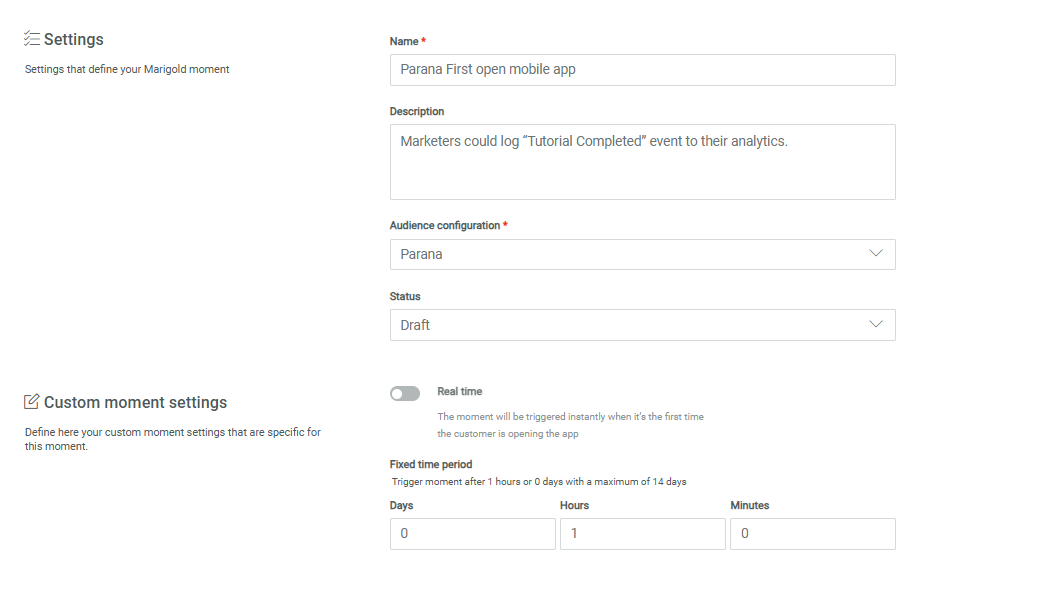
Real time — This option allows you to send a real time message, at the moment the app is being used for the first time. Toggle this option on if the message needs to be sent instantly. Leave the option off, if you want to send the message at a later time.
Fixed time period — Set the time delay, in days or hours, after the app's first use when a message needs to be sent. Default is 1 hour. This option is only available when Real time has been toggled off.
Example:
First select the First Open Mobile App Moment:
In the properties, fill out the name, description and select the Audience Configuration to apply to this Moment.
Next, in the properties, choose between triggering the moment in real time or after a set time period, for example 1 hour.